Catch a Staged App Rollout in the App Store Charts Before It Goes Wide
An app charting in one small storefront and nowhere else is a rollout in progress, but only if you can prove the absence is real.
A game sits at rank 14 on the New Zealand top-free chart and appears nowhere in the top 100 for US, GB or DE. Nine days later it turns up in Ireland and the Philippines, still absent everywhere large. Nobody announced anything. You are watching a staged rollout, and the chart data gave it away before the press did.
The part that makes this tractable is also the part that makes it easy to get wrong: a soft launch is not a fact about an app, it is a fact about the difference between storefronts. You cannot see it in one country’s chart at all. You need the same chart type, at the same depth, across a grid of countries, from the same moment. Then you need to be honest about what “absent” actually means, because your dataset only ever contains presences.
One run, the whole grid
The fetch layer is the App Store Rankings Scraper on Apify. One run expands countries × chartTypes × categoryIds into a chart each, so the grid is an input parameter rather than an orchestration problem. Start with the smallest possible run to see the shape of a row:
1
2
3
4
5
6
7
8
9
10
11
12
13
14
15
16
17
import { ApifyClient } from 'apify-client';

const client = new ApifyClient({ token: process.env.APIFY_TOKEN });

const run = await client.actor('arman-bd/app-store-rankings-scraper').call({
  countries: ['us'],
  chartTypes: ['topfree'],
  limit: 6,
});

const { items } = await client.dataset(run.defaultDatasetId).listItems();
const { value: summary } = await client
  .keyValueStore(run.defaultKeyValueStoreId)
  .getRecord('RUN_SUMMARY');

console.log(summary.appsPerChart); // { 'us/topfree': 6 }
console.log(items[0]);
That run returned six rows. The first one, with summary and iconUrl trimmed with …:
1
2
3
4
5
6
7
8
9
10
11
12
13
14
15
16
17
{
  "country": "us",
  "chartType": "topfree",
  "categoryId": null,
  "rank": 1,
  "appId": "6741796873",
  "appName": "TikTok Pro - Events",
  "publisher": "TikTok Ltd.",
  "price": 0,
  "currency": "USD",
  "category": "Entertainment",
  "releaseDate": "2026-06-03T00:00:00-07:00",
  "iconUrl": "https://is1-ssl.mzstatic.com/…/100x100bb.png",
  "summary": "TikTok Pro - Events is a global discovery platform for videos …",
  "rights": "© 2024 TikTok Pte. Ltd.",
  "scrapedAt": "2026-08-06T23:25:50.360Z"
}
Fifteen fields, and nothing in there says “this app is new to New Zealand”. Everything below is built from what is present.
The same thing over REST, if you would rather not add a client:
1
2
3
4
5
curl -s -X POST "https://api.apify.com/v2/acts/arman-bd~app-store-rankings-scraper/run-sync-get-dataset-items?token=$APIFY_TOKEN" \
  -H 'Content-Type: application/json' \
  -d '{"countries":["us"],"chartTypes":["topfree"],"limit":6}'

curl -s "https://api.apify.com/v2/acts/arman-bd~app-store-rankings-scraper/runs/last/key-value-store/records/RUN_SUMMARY?token=$APIFY_TOKEN"
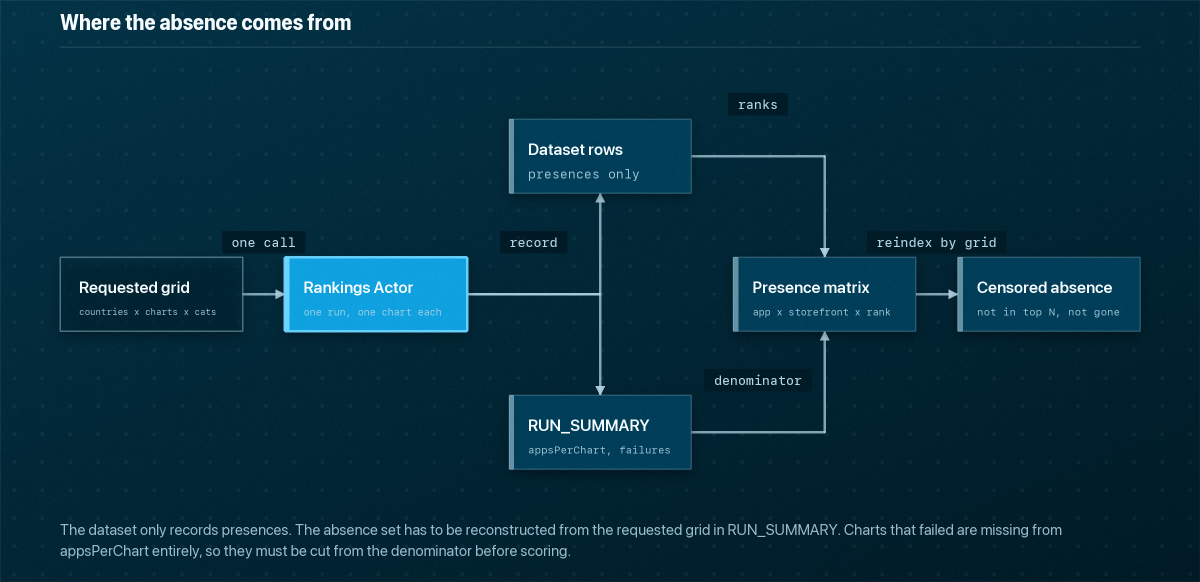
The denominator is in the key-value store, not the dataset
RUN_SUMMARY is the only place that records what you asked for. Its filters echoes the resolved grid, and appsPerChart is keyed country/chartType, with /categoryId appended when you restrict by category: { "us/topfree": 6 } in the run above. Charts that failed are absent from appsPerChart entirely and listed in failures instead.
That distinction is the whole detector. A missing app and a missing chart look identical in the dataset: no rows. Build the country list from what came back, never from what you sent:
1
2
3
4
5
6
7
8
9
10
11
12
13
14
15
16
17
18
const covered = summary.filters.countries.filter((c) =>
  Object.entries(summary.appsPerChart).some(([k, n]) => k.startsWith(`${c}/`) && n > 0));

if (summary.chartsFailed > 0) console.warn('holes in grid:', summary.failures);

const presence = new Map();
for (const r of items) {
  const key = `${r.appId}|${r.chartType}|${r.categoryId ?? 'overall'}`;
  const row = presence.get(key)
    ?? { appName: r.appName, publisher: r.publisher, rights: r.rights, ranks: {} };
  row.ranks[r.country] = r.rank;
  presence.set(key, row);
}

const narrow = [...presence.values()].filter((p) => {
  const hits = covered.filter((c) => p.ranks[c] !== undefined);
  return hits.length >= 1 && hits.length <= 2;
});
Note categoryId ?? 'overall' in the key. An app can be top-10 in Entertainment in one storefront and outside the overall top 100 in the same storefront; merging the two into one presence row manufactures phantom rollouts.
Absence is censored, not observed
limit caps every chart at the same depth. 200 is the ceiling, and in practice the feeds truncate around 100. So “absent from the US” never means absent. It means not in the top N of that chart in that storefront, and if you ran the demo input, N was 6.
Your absence set is therefore only comparable when limit and the country list are held constant. Change either mid-series and every historical absence silently changes meaning. Freeze both, write them into your warehouse alongside the rows, and reject any comparison across runs whose filters do not match:
1
2
3
4
const gridKey = (s) => JSON.stringify([
  [...s.filters.countries].sort(), [...s.filters.chartTypes].sort(),
  [...s.filters.categoryIds].sort(), s.filters.limit,
]);
The clock you have to build
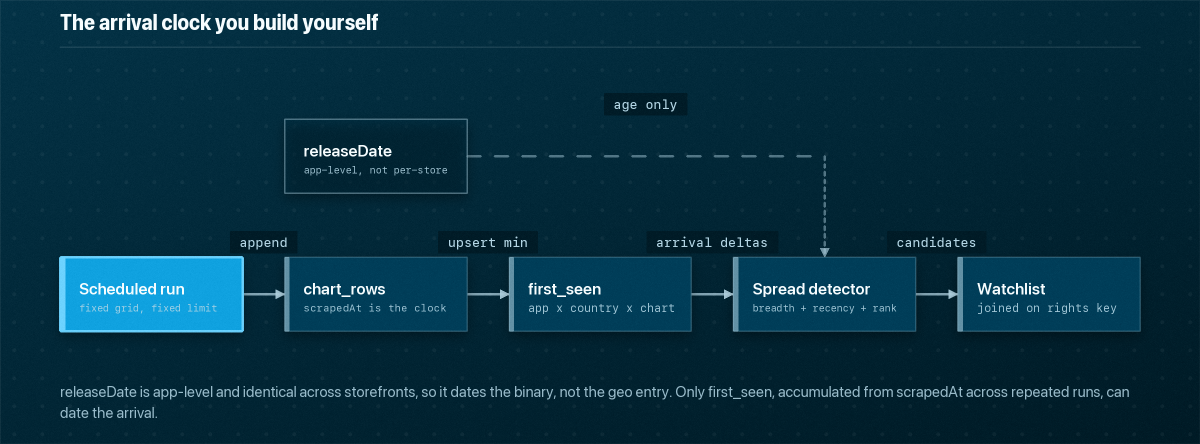
releaseDate reads 2026-06-03 in the sample against a scrapedAt of 2026-08-06. It is an app-level date: the same value appears in every storefront’s row for that app. It tells you the binary is new; it cannot tell you when the app arrived in New Zealand, because Apple’s per-storefront availability date is not in the feed at all.
The only clock you have is scrapedAt, which means arrival has to be inferred from your own polling history:
1
2
3
4
5
insert into first_seen (app_id, country, chart_type, first_scraped_at, best_rank)
select app_id, country, chart_type, min(scraped_at), min(rank)
from chart_rows group by 1, 2, 3
on conflict (app_id, country, chart_type) do update
  set best_rank = least(first_seen.best_rank, excluded.best_rank);
Then the candidate query is breadth plus recency, not rank:
1
2
3
4
5
6
7
8
9
10
11
with breadth as (
  select app_id, min(app_name) as app_name,
         count(distinct country) as countries,
         min(first_scraped_at)   as debut,
         min(best_rank)          as best_rank
  from first_seen where chart_type = 'topfree' group by app_id
)
select * from breadth
where countries <= 2 and best_rank <= 50
  and debut > now() - interval '14 days'
order by best_rank;
Direction matters, and so does rights
The signal is asymmetric in a way that is easy to miss. An app charting top-20 in New Zealand and absent from the US is a rollout candidate. An app charting top-20 in the US and absent from New Zealand is just a domestic app, and there are thousands of them. Score presence in small storefronts against absence in large ones and never the reverse; a symmetric “charts in few countries” filter will bury you in local news apps and regional banks.
The second useful asymmetry is in the identity fields. The sample record carries publisher: "TikTok Ltd." and rights: "© 2024 TikTok Pte. Ltd." in the same row: two different legal strings for the same operator. Soft launches routinely ship under a regional subsidiary, so exact-matching on publisher treats a test entity as an unrelated company. Strip the symbol and year from rights, take the leading tokens, and use that as a coarse second key:
1
2
3
4
const rightsKey = (r = '') => r
  .replace(/©|\(c\)/gi, '').replace(/\b(19|20)\d{2}\b/g, '')
  .toLowerCase().split(/[\s.,]+/).filter(Boolean).slice(0, 2).join(' ');
// "© 2024 TikTok Pte. Ltd." -> "tiktok pte"
Join candidates to your existing publisher watchlist on that key before you join on publisher, and a familiar name emerges from a shell entity you have never seen.
Before you trust an alert, check three things: that chartsFailed was zero for the countries in the comparison, that the app is missing from the overall chart and not merely from a category chart you forgot to request, and that the grid key of the run matches the runs it is being compared against. The failure that will actually cost you is the quiet one: widening the country list to improve coverage, and thereby turning every previously recorded absence into an untested assumption.